

Tempo, BPM and MPM
Dance music is measured in measures per minute (MPM). MPM is the tempo in beats per minute (BPM) divided by the beats per measure, and that number depends on the dance:
| Beats per measure | Dances |
|---|---|
| 2 | Samba, Paso Doble |
| 3 | Slow Waltz, Viennese Waltz |
| 4 | Tango, Slow Foxtrot, Quickstep, Cha-Cha-Cha, Rumba, Jive and the special dances with a fixed tempo (Boogie Woogie, Salsa, Discofox, Bachata) |
A Slow Waltz at 87 BPM is therefore 29 MPM, and a Quickstep at 208 BPM is 52 MPM. The Library shows both values side by side.
Practice Studio measures the tempo of your songs itself. Your music files are never changed in the process.
BPM Analysis
Section titled “BPM Analysis”Under Media Manager → BPM Analysis the app measures the tempo of your whole library offline, without you having to play every track once.
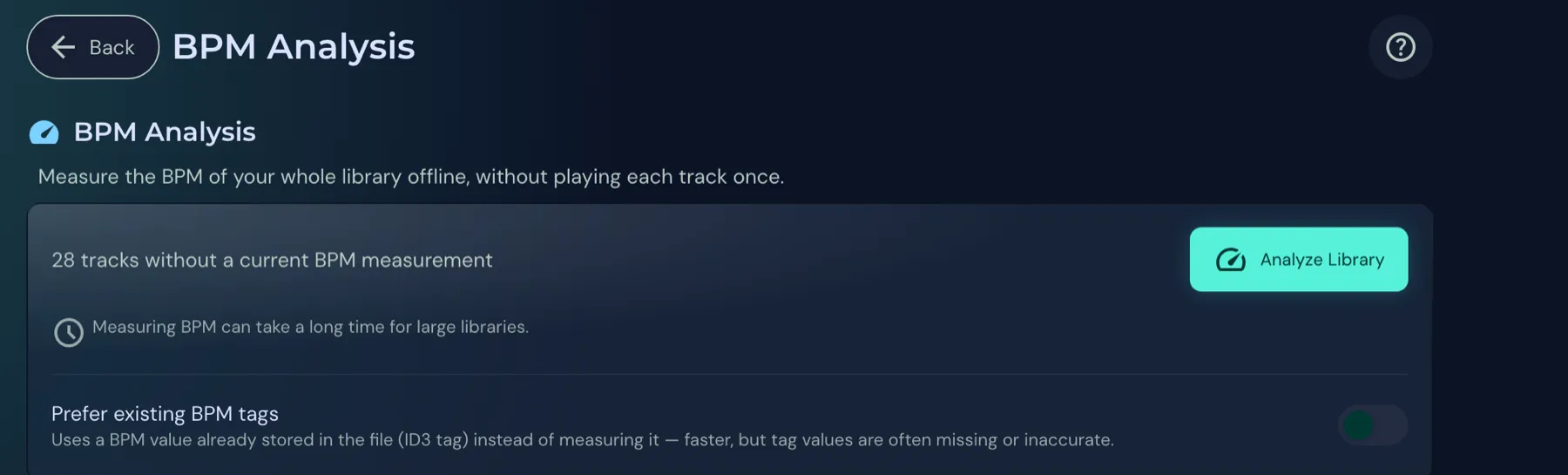
- Analyze Library: Starts the measurement for all tracks without a tempo. Next to the button it says how many tracks are still missing a measurement (“28 tracks without a current BPM measurement” in the picture). When all tracks are measured it says “All tracks are analyzed” and the button is greyed out. With many tracks this can take a long time.
- Prefer existing BPM tags: The app takes a BPM value that is already stored in the file (ID3 tag) instead of measuring again. That is faster, but tag values are often missing or inaccurate.
- WMA files are skipped because they cannot be measured automatically. Enter the tempo by hand in the Paso calibration, see Paso Doble Training.
Tempo measurement report
Section titled “Tempo measurement report”Below that, the report shows how far the measurement is, “373 of 402 tracks have a measured tempo” in the picture. The line under it names the other sources of tempo: from the file name (for example “SW28” on dance music CDs), from the tag, and without tempo.
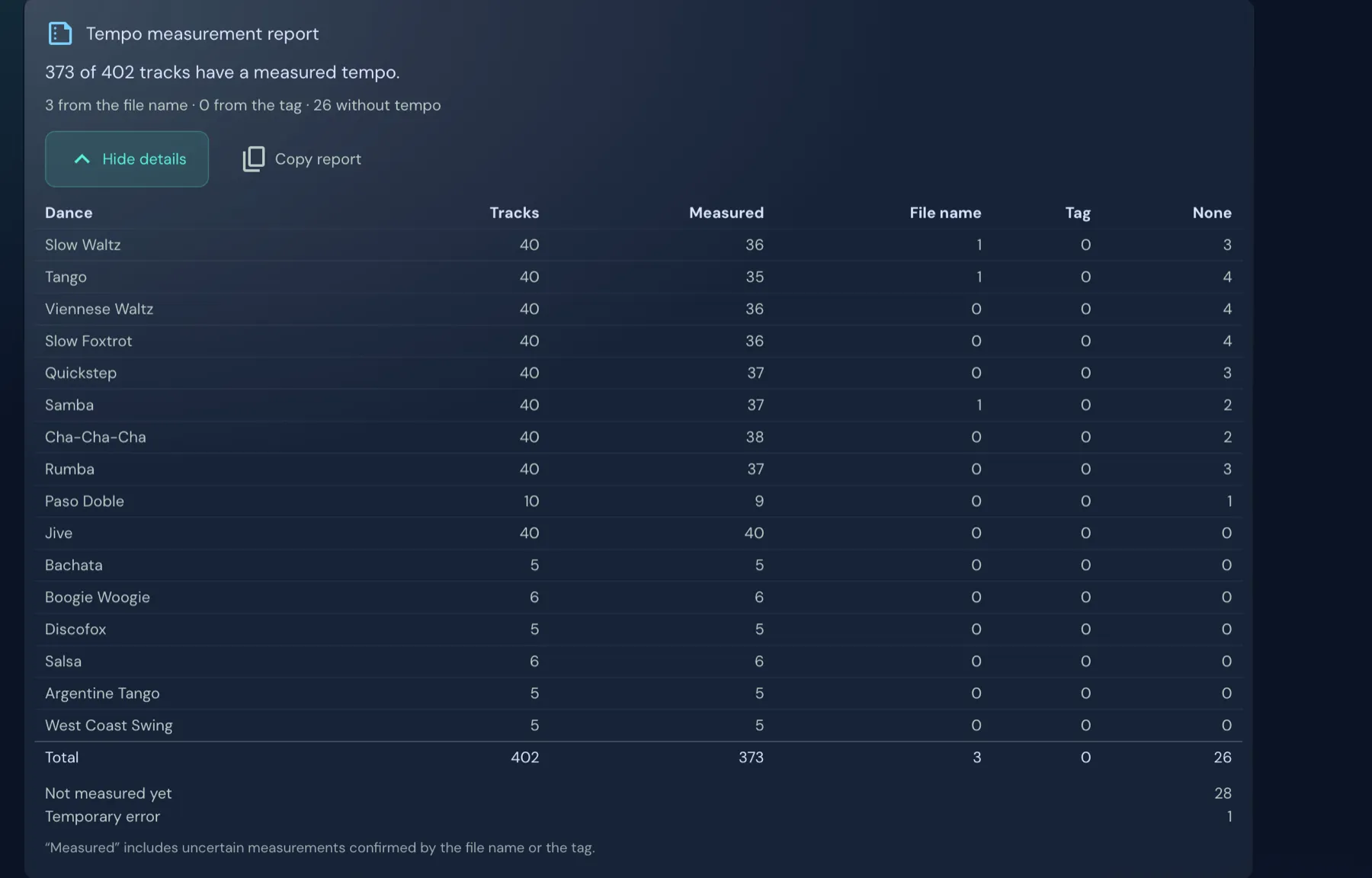
Details per dance expands the table. It shows, for each dance, how many tracks are measured, how many have their tempo from the file name or the tag, and how many are still without tempo. Copy report copies the report, for example for a bug report.
Under the table it says why tracks have no tempo:
| Reason | Meaning |
|---|---|
| No clear beat | The app found no clear rhythm. |
| File not readable | The file is damaged or in an unsupported format. |
| Temporary error | Trying again usually helps. |
| Not measurable (WMA, DRM) | WMA files and tracks with copy protection cannot be measured automatically. |
“Measured” also includes uncertain measurements that the file name or the tag confirms.
Where a tempo comes from
Section titled “Where a tempo comes from”Next to a song’s tempo it says where the value comes from:
- Measured: Practice Studio analysed the song itself.
- From tag: The value comes from the file’s ID3 tag. It may follow a different convention and differ from the actual MPM.
- From file name: The value comes from the tempo label in the file name, as dance music CDs provide it. It was not measured.
Competition tempo (WDSF)
Section titled “Competition tempo (WDSF)”If a song lies clearly outside the competition tempo of its dance, the app marks it as Slower than WDSF or Faster than WDSF. That is, for example, a slower practice version or a faster show version.
With the tempo control at the bottom of the player bar you play every track at competition tempo:
- Tempo changes the speed in percent. There is a button that resets it to 100%.
- Target MPM (from Pro) sets the tempo you want in measures per minute. The app converts the speed itself.
- The WDSF button next to it sets the competition tempo of the dance, for example 29 MPM for the Slow Waltz.