

Library
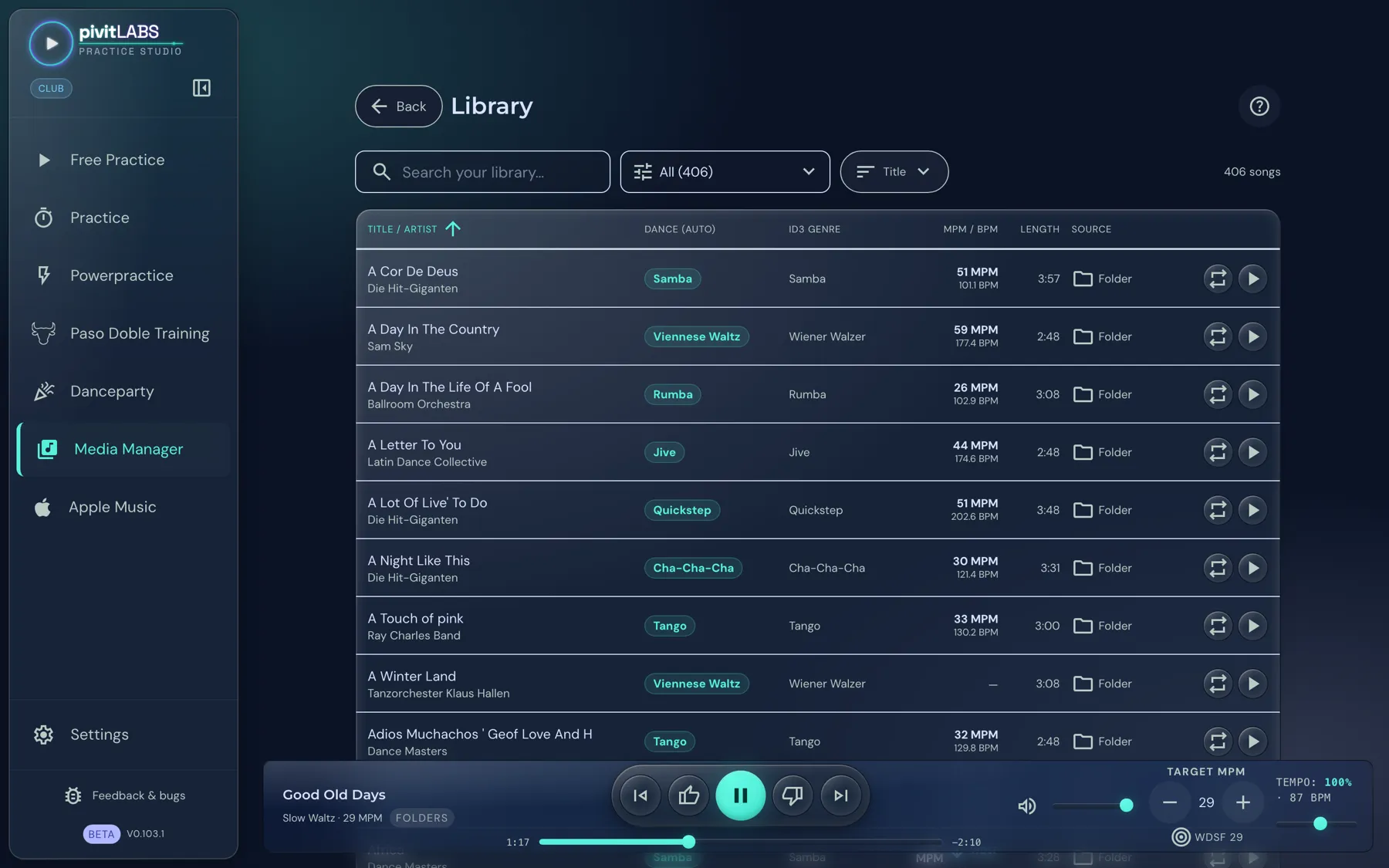
In the Library you see your entire collection at a glance: all songs from all linked sources, searchable and filterable by dance and source.
How to open it
Section titled “How to open it”Click Media Manager in the sidebar. There you choose one of four tiles:
| Tile | What it is for |
|---|---|
| Library | Search, filter and play your songs. |
| Sources & Mapping | Link music sources and assign them to dances, see Setting up your dance music. |
| Curation | Manage favorites, disliked and blacklisted songs (Club). |
| BPM Analysis | Measure the tempo of your whole library offline, see Tempo, BPM and MPM. |
Search, filter, sort
Section titled “Search, filter, sort”At the top of the Library are four controls. Next to them you see how many songs are currently shown.
- Search: It searches title and artist across your whole library.
- Dance filter: The first selection field shows “All” with the total number. It lets you show only songs of one dance or genre. “Unassigned” shows the songs that have no dance yet.
- Source filter: The second selection field shows only songs from one particular source.
- Sort: You sort by title, artist, tempo, source, dance, ID3 genre or length, ascending or descending.
The dance and source filters work together: the list shows only songs that meet both conditions. Reset clears the filters again.
The columns
Section titled “The columns”| Column | Meaning |
|---|---|
| Title / Artist | Name of the song and the artist. If the artist is missing, it says “Unknown”. |
| Dance (auto) | The dance the song is assigned to. |
| ID3 genre | The genre stored in the file. |
| MPM / BPM | The measured tempo in measures per minute and in beats per minute. |
| Length | Length of the song. |
| Source | Where the song comes from: Auto (recognised automatically), Folder or Playlist. |
At the end of each row are two buttons: Play and Repeat. With Repeat the song plays in a loop.
Editing a song
Section titled “Editing a song”Click a song to edit it. There you set the dance if the assignment is wrong, see the tempo and measure it again if needed. The app remembers your correction, even if you rescan the folder later.